
Lune SSG
Lune is the all-in-one tool for building shelter plugins. One of its capabilities is its SSG (static site generator), which can build you a static website that users will see when visiting your repository's webpage, or more crucially when pasting a plugin's URL into their browser instead of into shelter.
WARNING
Customising Lune SSG is a topic that becomes relevant at the deployment stage. You may want to skip this one and come back later, as the guides following this one have more immediately relevant information for plugin development.
How do I use it?
To build a webpage for a single plugin, run lune ssg single in your plugin directory. A webpage will be emitted into the dist folder.
To build a website for a monorepo full of plugins, run lune ssg ci in the root of the monorepo, after running lune ci. A full website will be emitted into the dist folder, alongside your built plugins.
How do I customise my website?
The static site generator works with various template files that are combined together at build-time to produce the site.
The interesting data is templated in using Handlebars, and each template is a handlebars partial.
You can define whatever extra partials you want, and Lune SSG will automatically find and provide them to Handlebars.
Any partials you provide will override the default ones, and you can provide them per-monorepo and per-plugin. The index page will only be built using your per-monorepo partials, but the plugins' individual pages will use your per-monorepo and per-plugin partials.
Custom partials go in the lune-ssg folder either in your monorepo root, and/or in the invidiual plugin's folder.
You can also put your own styles.css in lune-ssg, which will override the default stylesheet. Note the templating engine is not ran on stylesheets.
The three special partials are layout, index_main, and index_plugin. More details below.
You can override the data passed to the template engine in your lune.config.js by providing the ssg object.
You may find it helpful to consult the list of default partials, for small tweaks to the site, and you will definitely find it useful to see the data provided to the templating engine.
The default website, to use as a base to copy partials or styles from to modify to your needs can be found here.
Recommended customisations
I recommend you add a lune.config.js with:
import { defineConfig } from "@uwu/lune";

export default defineConfig({
  ssg: {
    repo_name: "Name Here's Plugins",
    base_url: "https://your.site/shelter-plugins"
  }
});
Without repo_name, your plugin site will be generated with the name of the folder as the site name, which is likely to be something boring like "shelter-plugins".
Without base_url, the copyable plugin links will be generated on the client side with Javascript. Setting this will allow them to be statically generated. More info.
You may want to have more interesting content on the plugin pages than just the shelter manifest description. You can easily achieve this by adding the file shelter-plugins/plugins/my-plugin-name/lune-ssg/description.html. The manifest description text can be used via the {{description}} expression.
List of default partials
The default website's list of partials is:
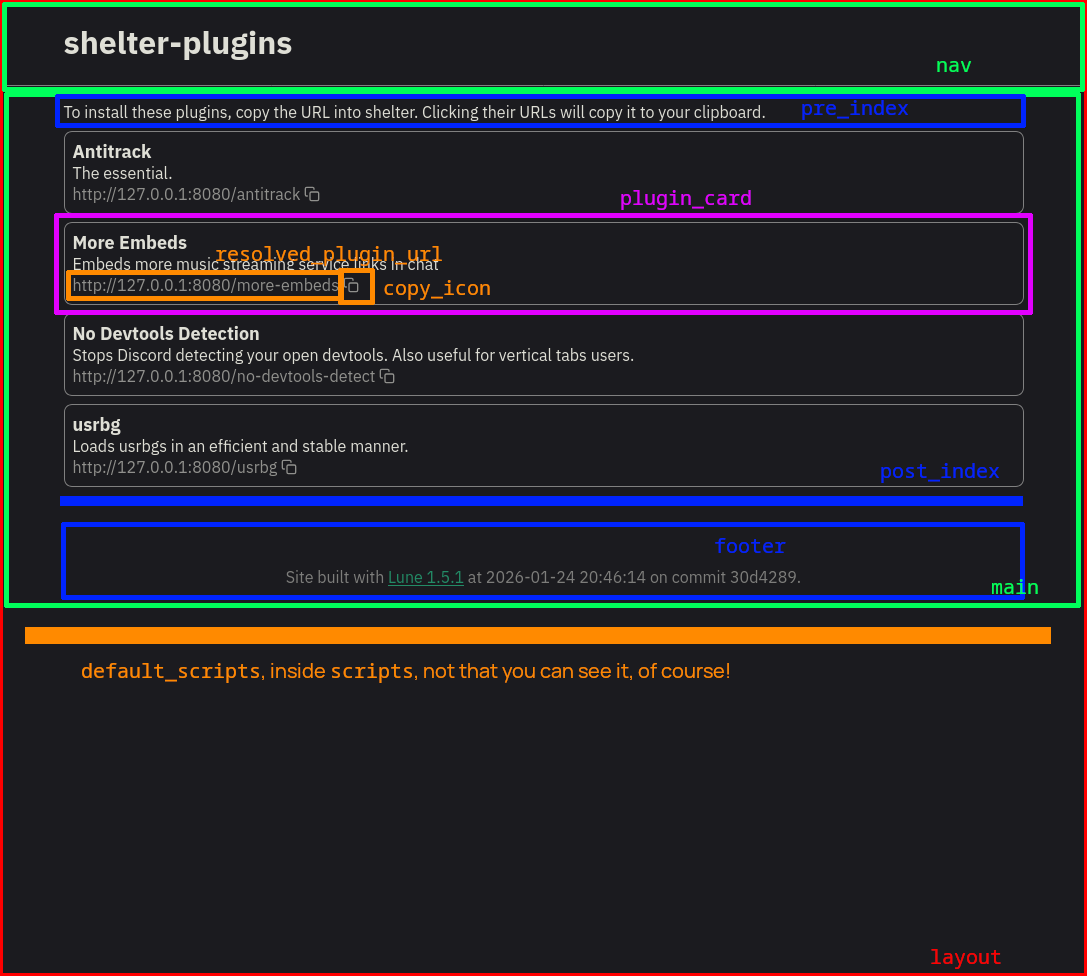
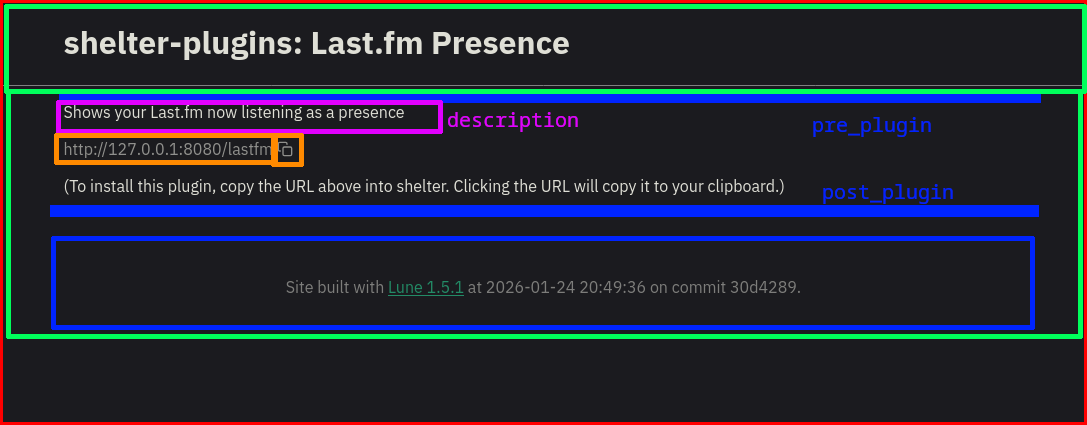
layout: The root of the site, contains the<!DOCTYPE html>and all that crapscripts: Script tags to add to the page. Override this one to add your own scripts, and re-importdefault_scripts.default_scripts: Scripts tags added to the page in the default website. You have no reason to override this, like ever, just overridescripts. This is used to dynamically resolve the leading URL for plugin URLs (https://your.site/shelter-plugins or whatever).nav: Content in the navbar at the top of the pagemain: Main content below the nav bar. This partial is special! You should not define it explicitly as it will not be picked up if you do that. This is instead aliased to eithermain_indexormain_plugindepending on which kind of page is being built.main_index: The main content for the index page. Override this instead ofmain.main_plugin: The main content for plugin pages. Override this instead ofmain.footer: Website footer - "Built with Lune at [date] on commit [hash]"descriptionThe main description content of the plugin page. By default, just the manifestdescriptionkey.pre_index: Content injected before the plugin list in the defaultmain_index.post_index: Content injected after the plugin list but before the footer in the defaultmain_index.pre_plugin: Content injected before the plugin description in the defaultmain_plugin.post_plugin: Content injected after the plugin link but before the footer in the defaultmain_plugin.plugin_card: The content generated for each individual plugin in the index listing.resolved_plugin_url: A span that will be populated with the absolute URL to your plugin at runtime (e.g. https://your.site/shelter-plugins/my-plugin-name). You really don't get a lot out of overriding this, I don't suggest you bother. Ifbase_urlis defined (see below), this won't be a span, but just a plain string.copy_icon: A copy to clipboard icon SVG. This feels like a good place to remind you that these partial names are not special, you can add as many custom partials as you want to componentise your site. That's what this one is!back_icon: Self explanatory
Of these, scripts, pre/post-index/plugin, and description are there purely for you to extend or slightly modify the page, and are not actually used substantially by the default site.
Overriding the rest may require more substantial content, but you can always copy and modify the defaults as a base!
Visually, the default partials look like this:
Template data reference
The templating engine is passed a data object that is used to populate the site with info.
For all pages, the following info is populated:
const commonSsgData = {
  build: {
    time: "2026-01-24 20:49:36",
    version: "1.6.0",
    commit: "30d4289"
  },
  styles: "styles.css",
  repo_name: "shelter-plugins",
  plugin_title: "my-plugin",
  cond_infix_colon: ": ",
  cond_infix_bar: " | ",
  has_index: true,
  ...luneConfigSsg
}
Where luneConfigSsg is the ssg object from your lune.config.js, if it exists.
styles is the relative URL to the styles.css file. Depending on if you build using ssg ci or ssg single and if the page is the index or a plugin page, this might be ../styles.css. It is consumed by layout in the default site.
repo_name is the name of the folder containing your monorepo. When building pages for individual plugins this is an empty string. Probably you want to override this.
plugin_title is the pretty name of the plugin when building plugin pages, and the empty string when building index.
cond_infix_colon and cond_infix_bar have the contents : and | if the SSG is generating a plugin page in a monorepo. An expression like {{repo_name}}{{cond_infix_colon}}{{plugin_title}} will generate shelter-plugins: plugin-name in a monorepo, plugin-name in an individual page build, and shelter-plugins in an index page build.
has_index is true when building a monorepo, or false when building a single plugin page.
Index page only
const indexPageSsgData = {
  ...commonSsgData,
  plugins: [
    {
      name: "My Plugin",
      description: "My cool plugin that like does a thing or something",
      author: "My name!"
    }
  ]
}
plugins is a list of all plugin manifest JSONs (parsed) from the monorepo. You can add extra properties to your plugin.json files and use them here, if you want to add extra properties to the plugin manifest that your custom templates can use.
If you do an {{#each plugins}} {{/each}}, you can use components inside the each block as if they were on a plugin page, as the plugin's manifest content will then be available on the top level. For example, you could import {{>plugin_card}} on a plugin page and it would work the same as when inside of the #each on the index page.
Plugin page only
const pluginPageSsgData = {
  ...commonSsgData,
  name: "My Plugin",
  description: "My cool plugin that like does a thing or something",
  author: "My name!"
}
The contents of the plugin manifest for the current plugin are available directly in the template. Additional properties from the manifest are of course also appended here.
Optional template data
You can add whatever extra template data you want via your Lune config file. The default website template can pick up the following if you define them, but they will be undefined by default:
const optionalSsgData = {
  base_url: "https://your.site/shelter-plugins"
}
base_url is the URL you intend to host the index of your website at, without a trailing /. If supplied, the plugin links will not require shipping any Javascript to generate and will be statically output. If you serve your site from many URLs and want it to be dynamic, don't set this.
This is required to make {{>resolved_plugin_url}} be a plain string rather than a <span>, so if you want to use the resolved plugin URL in an attribute, for example href="{{>resolved_plugin_url}}", you HAVE to provide this.